What is a Curve card?

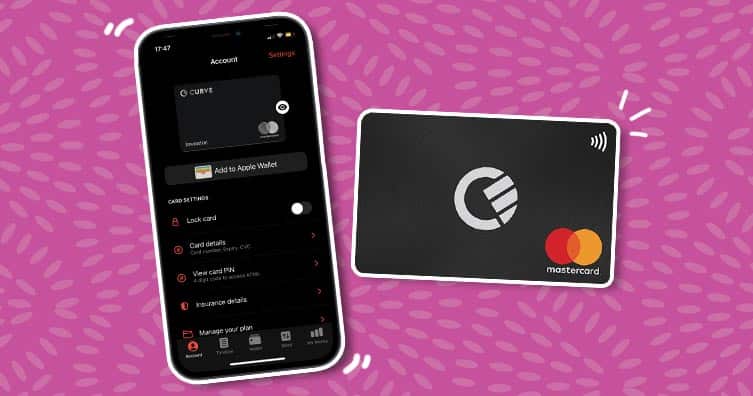
Many apps give users the option to track their spending to see how much is going out per month... but have you heard of the Curve card?
Credit: Curve
You may have seen us promote the Curve card on Save the Student, but do you know what it is and the advantages of using it?
There are so many benefits that come with owning a Curve card, such as getting the best rates on travel money, going 'back in time' to switch payment cards on a purchase and earning 1% cashback. You can also earn cash for free by referring friends and family!
Sign up here for the free £10 with Curve. When you sign up using our link, you'll get a £10 bonus within three days of making your first transaction of £10 or more.
What is Curve?
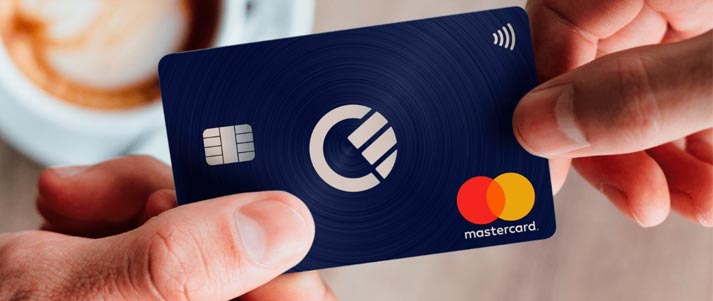
Curve is an app that conveniently stores all of your debit and credit cards in the same place, under one card. You'll be able to see what you've spent with which retailer and a summary of what you're spending in different categories, under 'insights'.
There are four different plans you can select when signing up for a Curve card. We'll explain all of the details later on. The standard plan is free and comes with some great perks, but not as many as Curve Pay X, which comes with a fee of £5.99 a month.
There's the option to pay £9.99 a month for the Curve Pay Pro, which will give access to Curve Cash (to earn cashback on your purchases). The most expensive card is £17.99 – however, don't write it off straight away, as it does have some big benefits, especially if you're a keen traveller.
What is Curve Cash?
Credit: Ubermensch Matt – Shutterstock
Curve Cash allows you to earn cashback on purchases you make with a Curve card. A loyalty scheme, if you please.
However, you'll require the Curve Pay Pro plan or the Curve Pay Pro+ plan to earn Curve Cash to spend as you wish.
For the Pro plan, you're able to select six retailers, and for the Pro+, you can select 12 retailers from which to earn cashback. You can choose from over 100 stores, including Deliveroo, Uber and Amazon. You could even earn cashback from supermarkets to save money on your food shop.
Customers on the free tier can benefit from a selected range of cashback offers in the “Rewards” section.
If you're a lucky duck and signed up with Curve before 16th February 2018, you'll be on their old cashback scheme. This essentially means that you can be on the free card and continue to earn cashback with selected retailers!
How do I spend my Curve Cash?
A single Curve Cash point is equal to one penny. If you earn 100 points, you'll have accrued £1 to spend. Your Curve Cash has no monetary value and as such, you'll be unable to withdraw it to your bank – you'll only be able to spend it using your Curve Card.
On the Curve app, you'll be able to view your Curve Cash in both GBP and Curve points. To switch views between these, simply tap the screen on your balance.
To use your Curve Cash, all you have to do is pay in full for your item with your Curve Pay or your Curve Cash card. Make sure you select this card to pay and ensure that the item you're paying for is covered in full by the amount in your balance, as you're unable to make any part payments with Curve Cash.
If your item is £5 and you've earned £4.99 in Curve Cash, you won't be able to use it for this purchase. You also won't be able to earn cashback on purchases you make using Curve Cash. If you get a refund on an item that you used your points to pay for, the money will be refunded back to your Curve Cash card.
Where can't you use your Curve Cash?
It's also important to note the limitations of Curve Cash ahead of time so you're well aware before using it. You're unable to withdraw Curve Cash at any ATM, nor will you be able to transfer it to a friend via Curve Send.
You can't redeem your points for cash. It's also important to note that they'll expire after 6 months, so make sure you're hot on spending them so you don't miss out.
What can you use Curve for?
Credit: Curve
As we mentioned above, the standard card is free (with a £5.99 delivery fee). You'll get up to £250 a month on fair FX rates and the ability to 'Go Back in Time' on purchases.
The next level up is the Curve Pay X. This is £5.99 a month. The main benefits of choosing this over the free standard card are free card delivery and fee-free ATM withdrawals of £300 abroad.
It also offers up to £3,333 a month on fair FX rates, so you can get good rates on selected currency for travel. If you're not travelling frequently, you may not need any more than this.
The Curve Pay Pro plan costs £9.99 a month and does everything that the Curve X card does, but gives you £50,000 access to fair FX rates and a fee-free foreign £500 cash withdrawal a month.
With Curve Pay Pro you'll get 1% cashback on six retailers selected by you on Curve Cash. That means if you're consistently spending with six companies, you can earn 1% of the value as cashback for you to spend!
Lastly, there's the Curve Pay Pro+ plan, which is a hefty £17.99 a month. You'll get everything we previously mentioned with the other Curve cards, plus you'll be able to withdraw a fee-free foreign £1,000 cash per month.
You're also able to select 12 retailers from which to gain 1% cashback on Curve Cash, as well as discounted worldwide airport lounge key access.
This may seem expensive, but if you're prone to travelling and spend a lot of money to gain cashback, it may be worth taking a look to see if this will suit your lifestyle..
Anti-embarrassment mode
Have you ever gone to pay using your debit card, and the payment has been declined? Embarrassing right? Don't worry, we've all been there!
Curve has cleverly developed an 'anti-embarrassment mode'. This is where users can set two backup cards that Curve will automatically use if a Curve card is declined at the checkout – saving you a red face at the till.
To activate the anti-embarrassment mode, head to the Curve app. You'll want to go to settings on the app, Features, Anti-Embarrassment Mode, then turn it on. You'll be prompted to choose up to two backup cards that Curve can use for payment if your set card fails.
Go Back in Time
Did you use the wrong card for a purchase and it messed up your accounts, leaving you annoyed and wishing you could go back in time to use your other card?
Another great feature of Curve is that you can 'Go Back in Time', for up to £5,000, up to 30–120 days (depending on which card you have) after you've paid for an item.
Changing the card you used to pay for an item couldn't be simpler. Tap the transaction you want to change, scroll to the bottom of the screen and choose 'Go Back in Time'.
All you need to do from here is swipe through your Curve Wallet on the screen and select the new card you wish to use for the payment. You'll only be able to do this once per purchase, so make sure you choose the right card!
If you need to Go Back in Time for purchases over £5,000, get in touch with them.
Section 75 protection
On top of this, with all Curve plans, you'll now be covered by Section 75 of the Consumer Credit Act if you use your credit or debit card through Curve.
Section 75 basically means that any transactions over £100 up to £30,000 are protected legally if the goods you purchased on a card weren't as they should've been, or if you didn't even receive them. You can find out more in our guide to how chargeback and Section 75 work.
Usually, Section 75 protection is reserved for credit card purchases. But Curve has become the first digital wallet to provide protection for all purchases, no matter whether made with a credit or debit card.
No charges on holiday

Credit: Poprotskiy Alexey - Shutterstock
An added benefit to the Curve card is that you can very easily use it for good exchange rates when you're at your destination. This way, you don't have to think ahead and potentially waste time trying to find the best rates.
No ATM fees abroad
Say goodbye to ATM fees when withdrawing cash abroad. The Curve card will allow you to make free withdrawals as long as you have a Curve X account or higher. If you're on Curve X, you'll get free withdrawals of up to £300 per month. If you have a Curve Pro card, you can take out up to £500 per month.
The Curve Pay Pro+ will allow you to withdraw up to £1,000, which is great if you're an avid traveller. But as we previously mentioned, this card will cost £17.99 a month.
Real-time alerts on your phone
You'll also be able to see real-time alerts on your phone as to how much you're spending and where. If you're sticking to a holiday budget (we love a budget!), it's helpful to keep track via phone notifications.
It's also great if you accidentally lose your card, so you can track if someone's spending on it and then freeze the card.
Get cashback
If you book with some of Curve's travel partners, you'll be able to get extra cashback with these retailers by paying with your Curve card.
What can't you do with Curve?
Credit: Chermen Otaraev – Shutterstock
As much as you can connect debit and credit cards, you'll be unable to connect your American Express credit card and any credit card from Maestro. As a result, you won't be able to combine any cashback from AMEX, for example, with Curve's cashback.
New customers since 2023 also can't add Visa cards issued from outside the UK or EEA.
How to apply for a Curve card
It's very simple to apply for a Curve card and claim your free £10:
- Head to this page to get your free £10 bonus with our promo code
- 'Click to get this deal'
- Enter your phone number to get started
- Download the Curve app
- Enter your personal details
- You'll be able to start spending almost straight away with Apple/Android Pay
- Once you've made your first transaction of £10+ within 14 days, you should get your free £10 in three days.
Is this the best app-based bank for you? Check out our full app-based bank comparison guide.